


- Home
- Companies
- Killet GeoSoftware Ing.-GbR ...
- Software
- CONVERT - Version 14.01 - Data ...
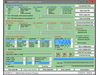
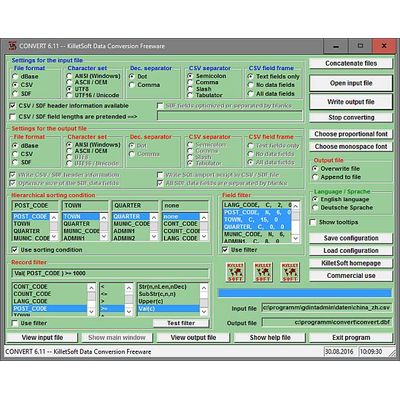
CONVERT - Version 14.01 -Data Conversion Freeware File Converter converts file formats and Character sets
CONVERT data converter freeware converts databases and files between the file formats dBase, CSV and SDF and the character sets ANSI, ASCII, UTF8 and Unicode and allows in the same time to sort the data and to do selections.
CONVERT - Version 14.01 - Last update on 10 May 2024
The latest important changes
- Certification of the program and the installer.
- CSV data fields may contain field separators and field delimiters.
- DataViewer show UTF8 and UniCode files in correct character set.
- Program control from the command line possible.
- Record selecting and data sorting with character sets ANSI, ASCII, UTF8 and Unicode.
Conversion of data files to other formats and character sets
The freeware program CONVERT from KilletSoft converts data files to other data formats and character sets. All data can be selected and sorted on data fields by the file converter. By the use of filter criteria data records can be selected. Data from several similar files can be joined to a common file. For the import in MySQL or SQL databases the `CREATE TABLE` script can be generated. Thus the import of the data in any data base management system or file system will be possible. A special feature of the program is the possibility to process CSV and SDF files that are larger then 4,6 gigabytes.
Conversions between this data formats are possible:
- CSV (Comma Separated Value)
- SDF (Simple Document Format)
- dBase (Borlands data base format)
Conversions between this character sets are possible:
- ANSI (American National Standards Institute) [single byte WINDOWS standard]
- ASCII (American Standard Code for Information Interchange) [single byte character set]
- UTF8 (Unicode Transformation Format) [multi byte character set]
- Unicode (Universal Character Set) [double byte character set]
This sortings and selections are possible with most of the convertions:
- Sorting on data fields
- Selection on data records, that match given criteria
- Selection on data fields
A help file contains global information to the program in form of an program intern electronic manual. The English or German language help can be called with the "Help" button while the program is running.
Normally you must select only the data format you need. The usually common parameters are already preset. Proceed as follows:
- If necessarily join several dbase files to a new single dbase file.
- Open this or an other dBase, CSV or SDF input file with "Open input file".
- Select all characteristics and data selections, which are needed for your data format.
- Write the converted data with "Write output file" into a file.
The program is in most cases self-describing. When running over with the mouse pointer you receive continuous assistance in yellow supported Tool Tip fields.
The program can be controlled by the user interface (GUI) or by calling it from the command line. When called from the command line the names of the files must match the OS conventions and the file formats. For multi file processing the wildcards `*` or `?` can be used in the file names. With the button `Save configuration` a configuration file with the current settings is produced, which later can be used, when entering the program from the command line. The configuration file has always the file extension `.ccf` (CONVERT configuration file).
Syntax and examples:
- CONVERT input_file output_file [configuration_file]
- CONVERT c:\post\zip.dbf c:\post\zip.csv c:\post\d2v.ccf
- CONVERT c:\post\*.dbf c:\post\*.csv c:\post\dbf2csv.ccf
After installation you find some geodata with data description of Killet GeoSoftware Ing.-GbR as test data in different subdirectories.
The freeware program can be downloaded from the Internet.