


- Home
- Companies
- Molecular Knowledge Systems, Inc.
- Software
- MKS - Version SYNAPSE - Chemical ...
MKS - Version SYNAPSE -Chemical Product Design Software
Synapse is a cutting-edge chemical product design software tool that revolutionizes the way molecules and formulations are designed to meet desired physical properties. By allowing users to input specific design constraints, such as azeotropic conditions, solubility limits, volatility, and flash points, Synapse generates thousands of candidate molecules through computational molecular assembly. Each potential molecule is evaluated against the defined constraints, ensuring that its properties fall within the specified ranges. Synapse's design capabilities include both graphical and combinatorial approaches, allowing users to either manually draw or automatically generate potential molecular structures. These design groups can be substituted into molecular structures, offering flexibility and control over the final product's chemical characteristics. This software facilitates the exploration of new chemical spaces for applications ranging from solvents to fragrance chemicals, enabling designers to innovate while adhering to environmental and toxicity standards.
Today’s chemical products must not only possess superior performance but also low toxicity and environmental compatibility, while being safe and highly innovative. Satisfying all these often conflicting constraints is a challenge for product designers. Synapse is a software tool which greatly assists in the design of better chemical products.
Synapse is an advanced chemical product design software tool giving you a radically new approach for designing molecules and formulations that possess desired physical properties. You first enter constraints, such as the need to form an azeotrope with water, minimum solubility limits, maximum volatility and minimum flash point. Synapse then generates thousands of candidate molecules computationally assembling each candidate’s molecular structure atom by atom. Mixture formulations are similarly generated by choosing from hundreds of possible components and enumerating thousands of compositions. Synapse finally estimates the physical properties of each of these candidates and evaluates each design constraint identifying those candidates which satisfy all design constraints.
The goal of a chemical product design is to create a molecular structure or mixture formulation that possesses a desired set of chemical and physical properties. Thus the first step of any design involves identifying design constraints.
Synapse represents chemical constraints as limits on substructures. For example, many chemical products should be stable at ambient temperatures. Thus, we often use a maximum limit of zero on unstable substructure such as:
| -O-O- | >N-O- | -O-CO-O- | >N-N< | -CO-O-CO- |
Synapse will eliminate any candidate structure that does not satisfy a structural constraint.
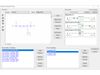
Design constraints are represented as ranges on physical properties. For example, the image to the left shows two design constraints:
353.15 K < boiling point < 393.15
800.0 kg/m3 < liquid density at 323.15 K < 1200.0 kg/m3
Synapse designs chemicals by assembling design groups into new molecular structures. Any set of groups can be used for a design. The selection of groups for new molecular structures can be guided by the user in a graphical design or automatically guided by the computer in a combinatorial design.
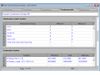
The image to the right shows that each design group has a set of limits imposed on its occurrence in new molecular structures. For example, every new molecular structure must contain at least two fluorine groups but no more than five fluorine groups.
In addition to limits on the occurrence of each design group in new molecular structures, each design must also contain limits on the total number of groups and total number of rings in new molecular structures. In the example shown in the image to the right, all newly designed molecular structures must contain between 4 and 8 groups and no rings.
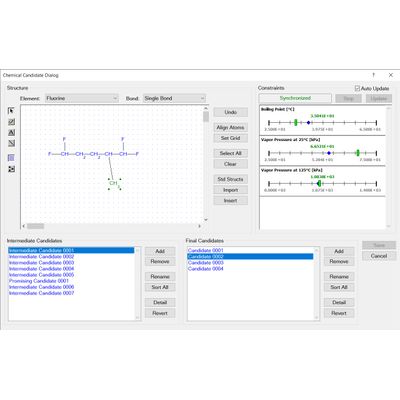
Synapse’s graphical chemical design capabilities gives you complete control over the search for new chemical products. To design new chemicals you to simply draw candidate molecular structures. Synapse then estimates required physical properties, evaluates design constraints and presents the results graphically. Using Synapse’s graphical design you can investigate the effect of changing your current product’s structure or composition, identify conflicting design constraints and discover relationships between molecular structure and physical properties.
For example, you could use Synapse to design new chemicals based similar to ethyl levulinate that have applications as fragrance chemicals:
- you first enter constraints based on ethyl levulinate's physical properties
- you then draw ethyl levulinate's structure into the graphical design's edit control
- you then proceed to make structural modifications to the structure with the goal of satisfying the entered constraints
Synapse’s combinatorial chemical design capabilities enable you to automatically search through thousands of candidate molecular structures finding those that satisfy your design constraints. Synapse assembles each of candidate structure by connecting design groups in all possible combinations. Each candidate structure is examined to ensure it satisfies all substructure limit constraints. The physical properties of remaining candidates are estimated and used to evaluate the physical property design constraints.
A combinatorial chemical design is a powerful tool for exploring the space of possible chemical products. Because chemical designs are based on groups, you can add any group you wish to a design. For example, if you were looking into chemicals derived from levulinic acid you would create the group:
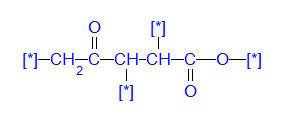
Synapse would then design candidate molecular structures by substituting design groups, in all possible combinations, for the free atoms (the [*] atoms)
Synapse's mixture designs are based on groups of ingredient chemicals called categories. A category represents a general set of chemicals. For example, an aircraft deicing fluid could have five categories: 1) water; 2) freezing point depressant; 3) surfactant; 4) thickener; 5) dye. The water category would contain a single chemical, i.e., water. The freezing point depressant category could contain several chemicals, e.g., 1,2-propylene glycol, 1-3 propylene glycol, ethanol, diethylene glycol, etc.
Synapse assembles mixtures from combinations of category chemicals. Each combination of chemicals is then assigned a composition using the input composition limits. The physical properties of this final mixture candidate are then estimated and used to evaluate each physical property design constraint.
For example, DMSO is a good solvent for many applications. Unfortunately, DMSO's high melting point of 18.52C can sometimes result in the freezing of stored material. Adding a freezing point depressing additive solvent can significantly lower the freezing point.
Designing such low freezing point mixtures in Synapse begins by creating two ingredient categories, a DMSO category and an additive category. The DMSO category contains only one chemical, i.e., DMSO. The additive category contains several common solvents. The image to the left shows the solid-liquid equilibrium curves for some of the designed candidates.
We are continually evaluating and adding new estimation techniques:
- we first compile the data needed to evaluate a new technique
- we code the technique into a knowledge base document using MKS's simple input language
- we use the analysis tools within Synapse to determine the applicability and accuracy of the technique
- we finally post the updated knowledge base on our website where our users can download the new data and new technique
Synapse come in four editions:
- Professional Edition: the Professional Edition provides an extensive windows interface, physical property data management, physical property estimation, chemical and mixture design and selection, and capabilities for graphing, reporting, and machine learning. The defining feature of the Professional Edition is that it enables you to create new documents, add new property data, enter new chemical structures, add new references, write new estimation techniques, and enter new designs and selections.
- Basic Edition: the Basic Edition also provides an extensive windows interface, physical property data management, physical property estimation, chemical and mixture design and selection, and capabilities for graphing, reporting, and machine learning. However, unlike the Professional Edition, none of your changes or additions can be saved with the Basic Edition. This makes the Basic Edition a great choice for experimentation. You may download the Basic Edition from our website.
- WebServer Edition: the WebServer Edition manages physical property data, provides physical property estimates, and has capabilities for graphing, reporting, and exporting. However. the WebServer Edition’s key capability is that it provides access to these data, estimates, and graphs via API requests over the Internet.
- Component Edition: The Component Edition manages physical property data, provides physical property estimates, and has capabilities for graphing, reporting, and exporting. However, the Component Edition’s key capability is that these data management and property estimation capabilities can be accessed by other Windows applications via a COM interface.