


- Home
- Companies
- Pro-Sapien Software Ltd.
- Software
- Pro-Sapien - EHSQ Action Manager ...
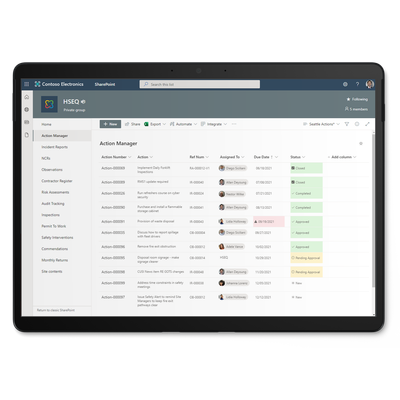
Pro-Sapien - EHSQ Action Manager Software on Microsoft 365
Track all corrective and preventive actions (CAPAs) with the Pro-Sapien EHS Action Manager on Microsoft 365. Using the platform your organization already knows, Pro-Sapien helps you increase EHS visibility, accountability, and engagement.
Whether it`s an incident, audit, or something else, chances are there`ll be follow-up actions. Pro-Sapien Action Manager Software manages corrective and preventive actions (CAPAs) as part of your EHS software on the Microsoft 365 platform you already know, with features to improve visibility, save time, and ensure standards are met
- Centralize EHS action management in Microsoft 365
- Increase visibility with organized status dashboards
- View your to-do list in SharePoint or Microsoft Teams
- Ensure follow-through with automated reminders and escalation
- Enforce high standards throughout the approval workflow
- Report on progress with Action KPIs in Power BI
Assign corrective or preventative actions following an incident, audit, or other event
Get oversight on all actions or a local view in the central, filterable Action Manager library
Identify statistics, overdue trends and areas for improvement in Power BI
Central action library
The central Action Manager is where all actions from your Pro-Sapien modules are held. The searchable, color-coded library makes it quick and easy to know who`s responsible for what and when, with saved Views for common filters such as Location or Status.
Assign from anywhere
You`ll find Action Manager integration with most Pro-Sapien modules including Incidents, Audits, Risk Assessment, and more. Actions can be assigned and tracked within these other modules, whilst being securely rooted in the central library.
Prioritize and categorize
Some actions require urgent attention, whereas others can wait until scheduled shutdowns. Therefore, the Pro-Sapien Action form allows you to prioritize and categorize actions in your preferred way, which can also be useful for trend analysis.
Approval workflow
Approve actions before they`re distributed, and review them once they`re completed. The ability to Approve or Reject an action provides further quality control, so you can be confident Closed actions have been completed to the expected standard.
Notifications and reminders
Automated notifications, reminders and escalation ensure nothing slips through the cracks. Emails contain high level information and a direct link to the action in Pro-Sapien, so the owner can easily find out what`s required.
Report on Action KPIs
All your data from the Pro-Sapien Action Manager is at your fingertips. Display KPIs on dashboards to identify where things are going overdue, or analyze trends in detailed Power BI reports. We configure the Business Intelligence model to meet your needs.