- Home
- Companies
- Leraand Engineering Inc. (LEI)
- Software
- SonarTRX Pro - Version x64 - Sidescan ...
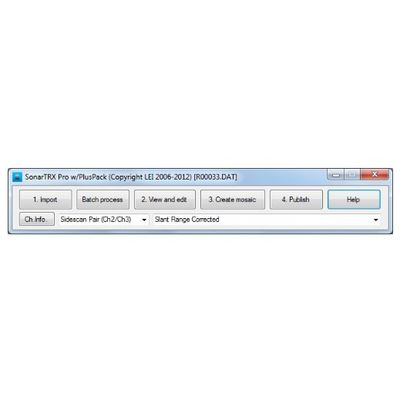
SonarTRX Pro - Version x64 -Sidescan Sonar Processing Software
SonarTRX Pro (x64) has the ability to import sonar files from several sonar manufacturers and generate geo-referenced images from the sidescan data. It can extract depth-along-track as estimated by the sonar, at various time-intervals (1, 2, 5, ...) from the default sonar channel, for bathymetric processing. It can also calculate the "first echo return" based on the recorded sonar data, and allows for digitizing the seabed manually to define the depth used for slant range correction, should that be necessary. SonarTRX Pro (x64) requires a 64 bit Windows operating system, which compared to a 32 bit system is capable of better utilizing available physical memory. This allows for loading larger sonar recordings and creation of larger MasterImages.
Data Import
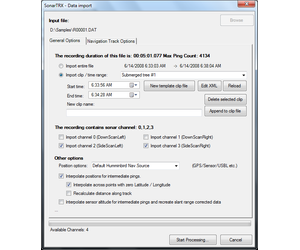
The various SonarTRX file importers (for each type of sonar file) have several common features:
- Import the entire file, or a time-segment of data
- Import data from select sonar channels
- Correction of sonar data during import.
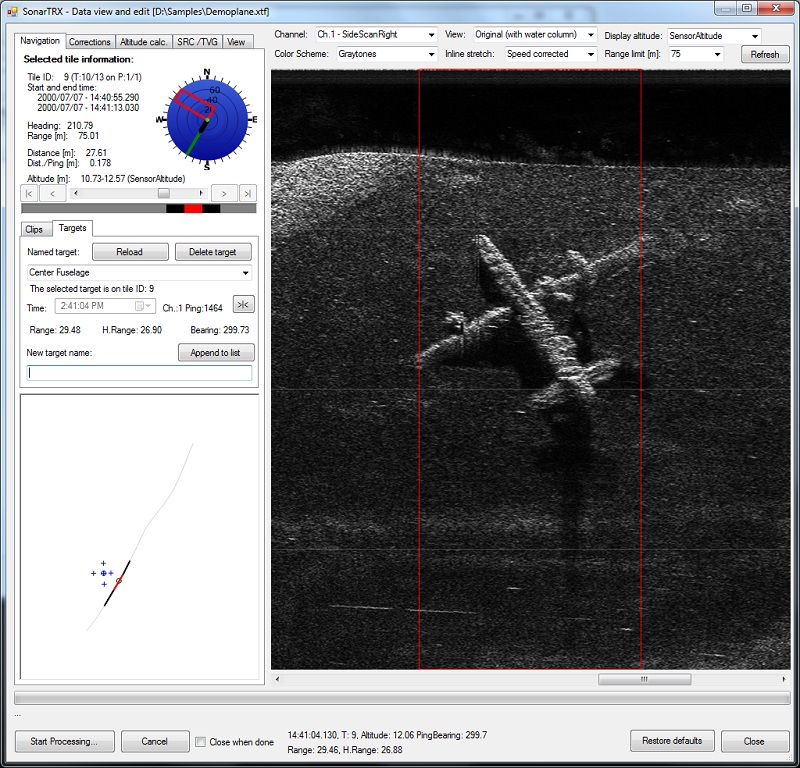
The cursor status information is shown below the view. Differential values are shown in brackets when carrying out a click & drag operation. The birds-eye map in the lower-left corner provides information about the location of cursor (small circle), targets (cross), selected target (circled cross) and active tile with respect to the trackline of the sonar recording (red line or circle). The location of the "page" (group of image tiles) currently loaded in the viewer is shown as the gray portion of the trackline. The above sample recording was obtained from available online xtf-samples. The sonar type was not specified.
The following is a summary of the sonar viewer / editor functionality that is common to all versions of SonarTRX:
General
- Selection of sonar channel and use preferred color scheme
- Use desired range and zoom level
- Choose among various inline scales or show speed-corrected images
Navigate within available data
- Paging mechanism to handle large files
- Display sonar coverage and navigation information for each image-tile
- Birds eye view that shows the navigation track of the sonar recording, the cursor location and position of the active tile etc.
Correction of data
- Tools to correct and manipulate data
- Recalculate slant-range corrected images
Change view preferences
- Adjust gain and contrast and save preferences
- Display grid lines
- Highlight bottom pixels
Measure, inspect and define targets and clips
- Cursor information that shows time, altitude, range, horizontal range etc.
- Create clips and define their start and end times.
- Capture Target locations and optionally paste to Google Earth Pro as KML placemarks
- Measurement tool - click and drag cursor to show differential values
- Tool to estimate the height of a bottom feature by measuring the size of the shadow
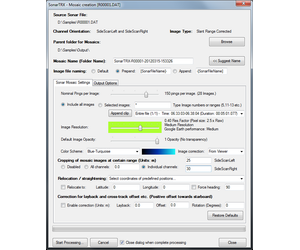
Having imported data and made any corrections using the viewer, SonarTRX can generate geo-referenced images for viewing with Google Earth or import to Geographic Information Systems (GIS). The SonarTRX Mosaic creation dialog includes many options to customize the output:
- Generate batch of image-tiles from entire recording, or from one or more named time-intervals (SonarTRX Clips)
- Merge batch of generated image-tiles into a larger Master Image, for easier import to GIS or for documenting a particular bottom-feature etc.
- If recording contains multiple parallel runs or overlapping sections, it is assumed that the user will define a SonarTRX Clip for each section. In that way, a separate batch of image-tiles & associated Master Image can be generated for each Clip separately, for import and assembly in the GIS.
- Select nominal number of soundings per image-tile. The recommended number of soundings per image-tile will depend on how well the survey was executed. (A steady state side scan sonar survey, with consistent heading and speed will allow for a higher number of soundings per image-tile.)
- Select a reasonable image resolution factor, keeping in mind that the highest factor of 1.0 is rearly used, because the along-track resolution is usually much lower than the theoretical lateral resolution of the sonar. Use of the highest resolution factor does not necessarily result in corresponding increase in quality of the geo-referenced images. (i.e. A poorly planned and executed side scan sonar survey, carried out at too high forward speed relative to the ping-rate, and excessive turns and vessel movements will not benefit much by using a resolution factor of 1.0)
- Auto-correct images (gain and contrast) or use sonar-data as imported.
- Crop the data at a certain range to skip poor quality data at far ranges, or to achieve desired overlap between images from adjacent survey tracks/clips.
- Basic correction for constant layback and constant cross-track offset for batch of image-tiles generated.
- Basic rotational correction to handle constant deviations between the pointing-angle of the transducer/towfish and the CMG of the segmented trackline, for batch of image-tiles generated.
- ...and more.
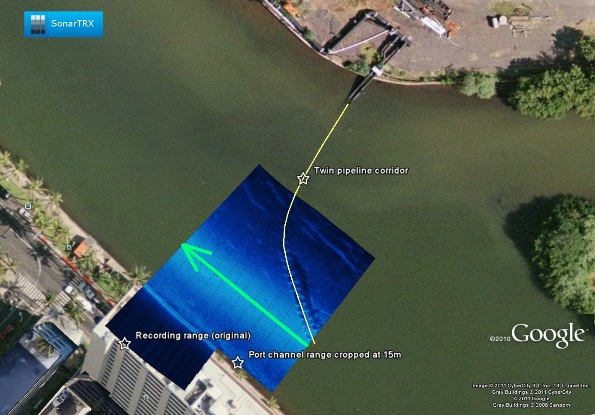
The following is a sample from a shallow water survey of a pipeline crossing: