

- Home
- Companies
- ThreeDify Inc.
- Software
- ThreeDify - GeoMine Foundation Module
ThreeDify - GeoMine Foundation Module
Defines block model universe orientation and dimensions manually or automatically from an existing block model CSV file; Defines the Mine Coordinate System (NEZ) for modeling.
Supports an astronomic block model universe with (2^40 x 2^40 x 2^40) blocks
Defines block model universe orientation and dimensions manually or automatically from an existing block model CSV file; Defines the Mine Coordinate System (NEZ) for modeling.
Supports an astronomic block model universe with (2^40 x 2^40 x 2^40) blocks
Imports continuous and/or categorical attributes from drillhole files or 3rd party block models. Creates continuous or categorical attributes using GeoMine’s powerful Formula Editor; Assigns attributes to block models or composites; Partition active attributes into data intervals and color-code block models, drillholes and composites by these intervals.
Creates wireframes from cross-sectional polylines; Creates 2.5D gridded or TIN surfaces and sets such a surface as the active topography.
Maps textures to surfaces.
Create and edit axis-aligned, non-axis aligned or scaled cross sections.
Create custom reports for block models, pit, stope, and cave designs, minable shapes and schedules.
Creates and edits user-defined formulas; Previews and debugs formulas; Copies and pastes full or partial formulas.
Defines color legend for active attribute; Defines drawing identification for plotting; Defines 2D and 3D display coordinate systems (for plotting).
Transforms existing CSV files by user-defined formulae; Reblock CSV files; Convert third-party sub-blocked CSV files to GeoMine .tbm format.
Creates lines, polylines(2D or 3D), circles, ellipse, rectangles, cubes, boxes, spheres and ellipsoids; Copy, delete, move, rotate, or scale objects; Insert poly vertex; Moves poly or mesh vertex; Deletes poly or mesh vertex; Deletes mesh face; Extend/shorten objects; Flips face or object normal.
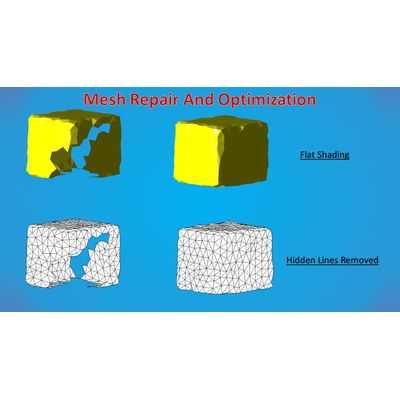
Creates extruded solids (from a polygon along a vector or path); Creates extruded solid from a mesh; Creates offset polygons; Creates polygonal profiles by slicing; Creates silhouette polygons from a mesh; Mesh simplification and optimization; Subdivides, smooths, splits or joins polylines; Polyline fillet and chamber; Connected-component separation.
Boolean operations on polygons and 3D solids (intersect, union, subtraction and symmetric differences); Trim mesh by plane or polygon; Re-mesh by Triangulation or Marching Cubes; Mesh repairing by hole filling and solidification; Mesh offsetting.
Measures overdig and underdig volumes between two arbitrary topo surfaces
Computes overdig/underdig/intersection solids between two topo surfaces
Creates static or associative linear dimensions (distance, axis aligned, point-to-plane), radial and angular dimensions; Creates 2D text, label and freehand objects; Measures line/plane azimuth and dip; Shows point/vertex coordinates.
Unlimited undo/redo history; Undo/redo last operation; Undo-to and redo-to a specific operation; Undo consecutive viewing operations; Inner command undo.
Orthographic and Perspective mode: True 3D perspective-correct zooming, pan, spin, ten preset views (including four isometric views), set view target, switch view to object, add/move/rotate/delete view clipping planes.
Range-select objects (within or outside a window); Area-select objects (within or outside a polygonal region); Select a single object; Un-select all objects; Hide or un-hide single or multiple objects.
Groups object into folders or groups with drag & drop and area-select interfaces.
Software and hardware rendering modes: Wireframe, flat shading, smooth shading, hidden line removal rendering modes; Backface cull, background color/image/texture, grid on/off, snap cursor to grid or vertex, show face normal on pick, show polyline vertex number Material colors: diffuse, specular, ambient, emissive, height, normals, shininess, opacity, vertex displacement, ambient occlusion; Transparency and lighting properties (up to 8 lights).
Starts new project, opens saved project.
Save, save as, save and backup projects.
Supports DWG, DXF, Datamine DM, Surpac DTM and STR, CSV, STL, Q3BSP, MDL, HMP, 3D, 3DS, ASE, AC, CSM, B3D, BVH, DAE, XML, X, Q3O, Q3S, MD5MESH, MD5ANIM, MD5CAMERA, IRRMESH, IRR, LWO, LXO, NFF, OFF, MD1, MD2, MD3, MDC, RAW, NFF, PLY, TER, SMD, VTA, OBJ, UC, IGES, STEP, BREP.
Supports over 40 GIS vector formats and over 70 GIS raster formats.
DWG/DXF, DAE, GLTF/GLTB, PLY, STL(binary), XGL, VRML 2.0, Block Model CSV, and PLX (ASCII Polyline) file formats.
Automation Interfaces; Import/Export Plugin SDK.