


AlphaSTAR
Toolpath Simulator for Stratasys Grabcad Print Pro
FromAlphaSTAR
Revolutionize your 3D printing workflow for Stratasys FDM machines with AlphaSTAR’s award-winning simulation software, now available as a plug-in for GrabCAD Print Pro. With toolpath-driven analysis, you can improve your design cycles and generate more precise, qualified builds, while also reducing print iterations. Quality assessment of toolpath and thermal process simulation are just some of the many benefits of this powerful software that will take your 3D printing to the next level.
Most popular related searches
printing system
material testing
elemental analysis
thermal analysis
distributed temperature
process analysis
- Digital Twin Technology for Fortus 450mc and F900 Industrial Printers – Create an exact virtual replica of the FDM printing process using time dependent toolpaths as direct input.
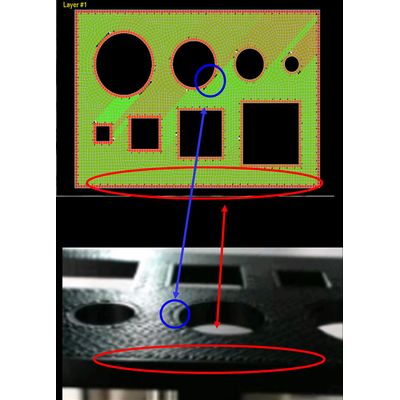
- Quality Assessment of Toolpath – Understand the effect of defects on part strength through numerical predictions of voids based on toolpath errors analysis.
- Thermal Process Simulation – Predict thermal distributions and micro voids based on the impact of infill styles, orientation, contours, and other slice settings on thermal buildup. This helps select quantitatively better process settings.
- Identify ‘Good’ or ‘Bad’ Prints before the Build – Considering material and printer, thermal simulation results will be compared to actual material test data flagging any local or global trouble regions that fall outside acceptable temperature ranges.
- Capture Realistic Thermal Behavior – Model exact layer thickness and run element-by-element analysis to identify temperature distributions, hot and cold regions, and heat entrapments.
- User-Friendly and Fast Run Times – With user-friendly interfaces and seamless connection to GrabCAD Print Pro, you can easily run simulations based on build tray settings and get results in just a matter of minutes to a few hours.
- Step 1 – User selections will determine printer, part, build orientation, and material system.
- Step 2 – Generate simulation ready toolpath to be used as input.
- Step 3 – Quality Assess Toolpath to detect voids based on toolpath and part geometry. In this step, a voxel mesh will be generated automatically. Optional input is available for user to input an external mesh from third party (e.g., Patran, Abaqus, etc.…). Based on results, user has the option to return to step 1 and adjust toolpath or proceed to step 4.
- Step 4 – Toolpath Driven Thermo-Physical Analysis to predict realistic thermal behavior during build process.
- Step 5 – User determines if thermal distributions are acceptable to avoid mechanical distortions. If yes, submit build job. If no, return to step 1 and adjust contours, infills, and other process settings to improve build.