

- Home
- Companies
- BIS Safety Software
- Software
- Training Matrix Software
Training Matrix Software
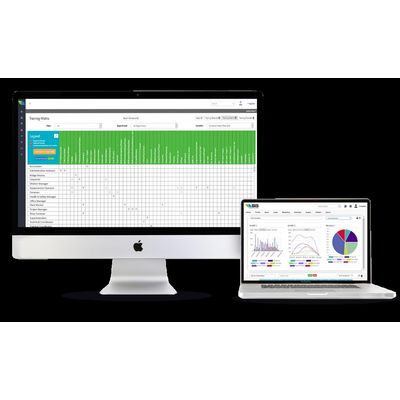
Training Matrix – Open up a World of Automation. The Training Matrix allows Mapping of Training Requirements for Automated Assignments. Using the Training Matrix, you can upload company roles and training topics that are unique to your organization, set training requirements and the courses that satisfy them, and quickly assign courses to thousands of employees. While many training systems take extensive time and effort to set up, ours can be implemented in three easy steps: Enter your company roles and training topics. Specify courses that satisfy the training topics. Set training as required or optional based on an employee’s company role and location. The Matrix software also has a robust competency management system that automatically triggers multiple levels of supervised assessments so managers can validate and confirm competency on almost any task, equipment, or soft skill training.
You can also view training gaps, customize reporting dashboard, and automatically assign the required online or in person courses. The Training Matrix system also has the ability to manage complex certification pathways, handling cases with multiple levels of training requirements.
The Training Matrix is considered the brain of the BIStrainer Learning Management System. Using its straightforward functionality, you can map out all of your organization’s training requirements to automate training renewal notifications, online course assignments, and online digital form assignments. You can also view gap reports, progress reports, status reports, and many more.
Large organizations often find that managing and tracking employee training is challenging and time-consuming. Oftentimes, this is due to paper-based filing systems that require manual verification, are difficult to share across multiple worksites, and take time to update. To overcome these challenges, the best solution is to automate the entire process. If you’ve never automated your training before, you may be asking, “Where do we start?”
The answer is simple. You start by creating your company-specific Training Matrix by entering your employee roles and training topics, then assigning learning requirements for the roles you created. For example, you can assign First Aid training as a requirement for all supervisor roles. To be even more specific, you can assign training requirements based on employee location. This allows you to cover any and all training that must account for regional safety regulation differences. Once the Training Matrix is set up, the system automatically delivers specified training to the employees who need them.
The system also tracks employee files and automatically updates employee training requirements as the assigned courses are completed. The system allows managers to see who is currently up-to-date with training and who needs additional training. This tracking is so detailed that, with just one click, a manager can download an Excel gap analysis report that identifies all potential compliance issues and gaps in training. Notifications about renewals and certificate expiration dates are automated to remind employees and their managers of any training that has expired or will expire in 90 days.
BIStrainer’s advanced Training Matrix feature allows you to quickly assign training and courses according to an employee’s role and location in your organization. All you have to do is enter a list of unique company roles (e.g., Driver and Carpenter) and a list of required training topics (e.g., WHMIS 2015 and TDG). Our system then uses this information to generate a Training Matrix for your company. To assign training to specific roles, simply click on the box where the role and required training intersect. It’s that easy!
Assign by Location
If you want to set training requirements by role and location, the Training Matrix can do that. This means if, for example, your drivers in one location need long-haul training but drivers in all other locations do not, the BIStrainer system can help you quickly assign the training only to the employees who need it.
Automate Notifications
The cloud-based BIStrainer software will also automate your notifications for expiring courses, sending emails to applicable workers, managers, and system administrators. This way, all key stakeholders know where each department, region, or location stands in terms of compliance training requirements.
Select Training Providers
Want to stipulate which courses and training providers are acceptable for each training topic? The Training Matrix has you covered! Enter the training topic (e.g., First Aid) then choose which training provider (e.g., ABC Inc.) and format (e.g., classroom) you will accept. From there, the system will only accept training that meets these requirements, and all other functions in the system, such as notifications, will respond accordingly.
Once you have assigned required training to all employees, it’s important to track who has taken their courses and who has not. With a click of a button, you can run a training gap analysis report to identify which individuals are behind. You can export this report into a Microsoft Excel file and see employee details like individuals’ first and last names, company locations, and the outstanding training topics.