
- Home
- Companies
- Killet GeoSoftware Ing.-GbR ...
- Software
- TRANSDATpro - Version 27.24 - ...
TRANSDATpro - Version 27.24 -Coordinate Converter for Worldwide Geodetic Coordinate Transformations and Datum Shifts
TRANSDATpro is a coordinate converter that performs coordinate rransformations fast and with high accuracy. The geodetic program supports worldwide thousands of Coordinate Systems, geodetic Reference Systems and Datum Shifts, user-defined systems, 2D/3D transformations, INSPIRE, NTv2, HARN, EPSG, GPS, continental drift and more. The coordinate converter reads and writes the file formats Text, CSV, SDF, dBase, Arc-Shape, Arc-Generate, KML, GPX and others. Furthermore: Outdoor GPS reception, mapping in Google Earth, Google Maps and OpenStreetMap, Meridian Convergence and Extra Parameter, Polygonal scopes in NTv2 files, multilingual user interface.
Since 1993 KilletSoft`s TRANSDATpro has been the coordinate conversion tool of first choice for GIS professionals, land surveyors and geodesists around the world. TRANSDATpro continuously gained in popularity since then and has maintained its reputation as one of the best coordinate conversion tools on the market. Additionally TRANSDATpro contains many more advanced geomatic tools such as 2D / 3D transformations, NTv2 and HARN grid shifts, GPS receiver module, considering of Continental Drift, INSPIRE- and EPSG support, and the ability to use custom best fit transformation parameters. TRANSDATpro has grown with many improvements over the years and it continuously benefits from user feedback. Thanks to the numerous improvement suggestions of the users the quality and the scope of functions of the program increase constantly.
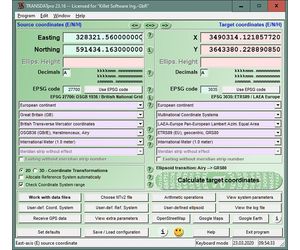
Besides the usual Geographic Information Systems (GIS), there is a wide variety of geodetic applications and data collections that are used for the acquisition, processing and presentation of spatial data. The thereby used spatial data are available in many different coordinate systems and reference systems (CRS). Here the program TRANSDATpro is needed to transform the spatial data of different data sources and data structures from one coordinate reference system (CRS) to another. TRANSDATpro has been developed on the basis of the Geodetic Development Kit GeoDLL, which allows to embed geodetic calculations in own computer programs.
TRANSDATpro is a professional computer program for Geodetic Coordinate Transformations between national and country-specific Coordinate and Reference Systems with high precision and good performance:
- The current and historical Systems of all countries of Europe
- The European ETRS89 systems forced by INSPIRE
- The US and Canadian NAD, NTv2, HARN and SPCS Coordinate Reference Systems
- The Coordinate Reference Systems of most countries of all continents
- The Coordinate Reference Systems of Germany, Austria and Switzerland incl. NTv2
- The Geographic coordinates in different notations and Cartesian coordinates
- Worldwide NTv2 gridfile supported Coordinate Transformations
- Worldwide used numeric and alphanumeric Coordinate Systems
- Most of EPSG supported Coordinate Reference Systems
- ITRS annual realizations or WGS84 epochs for GPS measurements
- WGS84 Coordinate Transformations in consideration of the continental drift
- User defined Coordinate Systems, Reference Systems and earth ellipsoids
- Meridian Convergence, Origin Center Meridian, Geographical Point Coordinates
In some countries, here Germany as an example, the there available Coordinate Reference System are broken down in more groups:
- The Coordinate Reference Systems of the old and new German Federal States
- The German `Lagestatus` Coordinate Reference Systems
- The high-precision Reference Systems of the German Federal States incl NTv2
- The 40 Soldner Coordinate Systems of the Prussian Land Registers
You find a complete list of the supported Coordinate and Reference Systems on our internet site and after downloading (see above) the free test version as part of the documentation.
TRANSDATpro supports all by the INSPIRE directive prescribed ETRS89 conversions with NTv2 grid data, e,g. Gauss-Kruger / DHDN to UTM / ETRS89 with BeTA2007. The NTv2 standard with national gridfiles is worldwide full supported. The use of EPSG codes for the Coordinate Reference Systems is possible. Apart from the given worldwide and state-specific systems, your own personal Coordinate Systems and geodetic Reference Systems can be defined with Helmert (Bursa / Wolf, ISO19111) or Molodensky Parameters. Calculations can be performed with coordinates entered directly, loaded from files in various formats (Text, CSV, SDF, dBase, KML, GPX, ArcShape and ArcGenerate), or passed via batch processing. Arc-Shapefiles can be viewed with the program-internal Shape Viewer. A programmable GPS interface makes it possible to read coordinates into a notebook computer from a low-cost GPS antenna.
The program has a user-selectable multi language interface and comes with extensive online help. The program can be run on most common networks and it is possible to use Terminal Services on WINDOWS Servers. In case of a network installation the clients are installed automatically by the program.
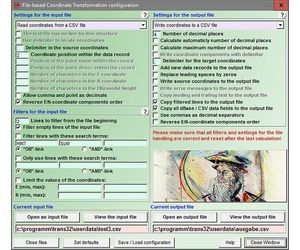
- Data input, data output and file formats
- Keyboard Mode for direct input of coordinates
- File Mode for data input from files and data output to files
- Batch Mode for batch processing of multiple files using a control file
- File formats Text, CSV, SDF, dBase, ArcShape and ArcGenerate for data input
- File formats Text, CSV, SDF, dBase, KLM, ArcShape and ArcGenerate for data output
- Conversion from one file format to another
- Very flexible file configuration
- Various filters for the input file
- Control of the notation of coordinates
- Copy function for Text, CSV, and dBase files
- Finding scattered coordinates in Text files
- Processing of text files without line orientation
- Shape to Shape function
- Shape to KLM function
- Support of the ArcGenerate GIS exchange format for geometries
- Log file with the results of the current session
- Export and import to / from configuration files
- One-click copy and paste of all coordinate components simultaneously
- Quality
- Strict formulas of Schatz, Schuhr, Klotz and Hooijberg
- Transformation parameters of the Surveying Authorities of the respective countries
- Consideration of the EPSG specifications
- Helmert 7-parameter Bursa-Wolf and Molodensky reference system transitions
- Exact NTv2 transformations for many countries
- High-precision NTv2 transformations for the German Federal States and other states provinces
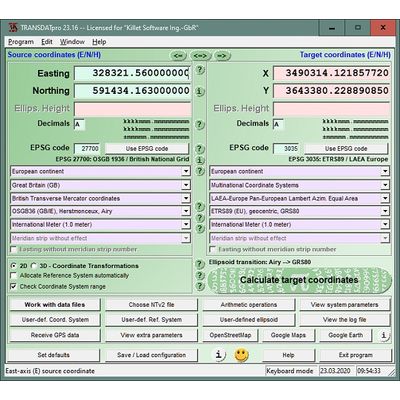
- Source and target Coordinate Reference Systems
- Worldwide and country-specific Coordinate Reference Systems
- Current and historical Coordinate Reference Systems
- Numeric and alphanumeric Coordinate Systems
- UTMRef, GEOREF, QTH, BNG and ING with different grid mesh sizes
- INSPIRE systems, ITRS annual realizations, WGS84 epochs, GPS coordinates
- 2D and 3D Coordinate Transformations
- Automatic selection of the quired NTv2 files
- Use of EPSG codes of the Coordinate Reference Systems
- Hierarchical structure by continent, country, Coordinate System, Reference System, Measurement Unit
- Selection of the meridian strip with UTM and Gauss-Krueger coordinates
- UTM and Gauss-Krueger coordinates with and without meridian strip number
- Selection of measurement units
- Use of summands and multipliers for the coordinate components
- Monitoring of range limits
- Option for automatic assignment of a Reference System to the Coordinate System
- Option for automatic assignment of a NTv2 files to the Reference System
- Visualization
- Viewer for the input and output files
- Display of shapefiles in a Shape Viewer
- Display of KML files in Google Earth
- Display of the last calculated coordinates in Google Maps / Earth and OpenStreetMap
- Screenshots of all program windows in BMP and GIF files
- Print of all program window with the corresponding settings
- View of the NTv2 parameters in a NTv2 Viewer
- View of the actual Coordinate Transformation parameters in a System Viewer
- Adjustable color design with color gradients
- GPS reception
- Reception of GPS coordinates with external GPS device
- GPS device or GPS-mouse by serial or USB interface
- Direct transformation of GPS coordinates
- Triggered and manual GPS reception
- Generating of a GSP file
- Display of the received GPS coordinates in a GPS Viewer
- Help System
- Detailed electronic manual
- Case-related assistance in all program windows
- Focused Info buttons for workspaces which need to be explained
- Uniformly geodetic terms on the program interface and in the electronic manual
- Explanation of geodetic terms in the glossary
- Online FAQ section for common questions
- Helpful online information
- Multilingualism
- Language choice for the user interface
- User interface in seven different languages
- Option to include new languages by the users
- User manual in English and German
- More features
- Possibility to download NTv2 files from the KilletSoft website
- Configuration of user defined coordinate systems
- Configuration of user defined reference systems and ellipsoids
- Network capability
- CITRIX support
- Possibility of a service contract for phone and E-Mail support
- Possibility to use the automated newsletter service via E-Mail
- Transfer of transformation parameter sets from the SEVENPAR program
- Display of electronically generated fractals for relaxation
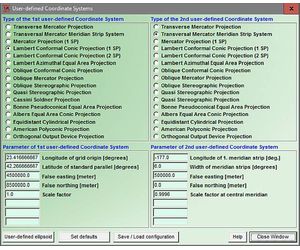
User defined Coordinate Systems
Additional to in TRANSDAT predefined Coordinate and Reference Systems listed under the link above, user defined Coordinate Systems can be used by the input of the necessary transformation parameters.
User defined Reference Systems (datum shifts)
During Coordinate System selection, the appropriate Reference System can be selected automatically or independent from the Coordinate System. The Reference Systems listed under the link above can be used for geodetic datum shift in both source and target Coordinate Systems. It is also possible to setup user-defined Reference Systems for transformations into regional grids or custom Coordinate Systems. The transformation parameters include three translation vectors, three rotation angles and a scale factor in case of the Helmert transformation "Coordinate Frame Rotation" or "Position Vector Transformation" datum shift, or three translation vectors in case of Molodensky three parameters datum shift.
User defined earth ellipsoids
User defined Coordinate Systems and user defined Reference Systems require the definition of suitable earth ellipsoids. The definition effected via the selection of pre defined ellipsoids or via the input of the semi axes of the source and target ellipsoids.
NTv2 support
Exact datum shifts in local systems are possible by supporting the  NTv2 standard with gridfiles.
EPSG codes (OPG)
The selection of the continents, countries, coordinate systems, reference systems and meridian strips can be simplified by the direct input of  EPSG codes.
Direct mode calculations
The source coordinates can be entered directly into the input fields of the program window and transformed using the previously selected settings. The calculated results will be displayed. The program will automatically save the entered source coordinates and the calculated target coordinates to a log file. You can review and retrieve log file contents using external programs.
File based calculations
It is very important to be able to perform fast calculations on large amounts of coordinate data stored in files of different file formats. TRANSDAT allows loading data from Text, CSV, SDF, dBase, ArcShape and ArcGenerate input files. A large number of Setup options allow the adjusting to different input file data structures. Calculated coordinates can be stored in Text, CSV, SDF ,dBase, KLM, ArcShape and ArcGenerate output files. Here again TRANSDAT offers a large number of program Setup options for the output file structure.
During the file handling the unrestricted conversion between the data formats named above is possible with or without Coordinate Transformations. Geometries saved as Arc-Shapefiles can be viewed in the programs internal shape viewer. Geometries saved as KML files can be viewed in Google Earth directly.
The conversion of the data formats for example makes possible the transfer of geometries contained in ArcView and ARC/INFO Shapefiles and in ARC/INFO Generate files to KML-Files, which can be used in Google Maps / Earth and OpenStreetMap. A further interesting example is the transformation of the geometries contained in Arc-Shapefiles and Arc-Generatefiles to other Coordinate Systems. TRANSDAT is able to convert between Arc-Generatefiles, Arc-Shapefiles and KML files, taking account of point, line and polygon shapes.
Line by line copying from Text files is particularly efficient, whereby the transformed coordinates are inserted in place of the original coordinates inside the text. The search for coordinates scattered arranged in the text and their conversion is possible. The flexibility of the program TRANSDAT opens a large count of further conversion possibilities, e.g. the use of filters.
Batch processing
The batch processing allows the automatic execution of one or more files using a batch file. Thus makes the program TRANSDAT controllable from other programs or it can transform large amounts of coordinates unsupervised.
Calculation accuracy
TRANSDAT uses Coordinate Transformation formulas based upon EPSG specifications and publications by Schatz, Schuhr and Klotz and Hooijberg. Algorithms used for country-specific transformations are either published or made directly available by the Measurement Authorities of the respective countries or by similar respectable institutions. To achieve the highest precision only strong formula algorithms are used for calculations.
Coordinate Transformations without changing the geodetic Reference System have extremely high precision ranging within millimeters. A good example of geographic coordinates transformations between Gauss-Kruger and UTM Coordinate Systems made with TRANSDAT are the results published by the North-Rhine Westphalia Land Survey Commission. It was confirmed that the differences were within the lower millimeter range.
For a statement about the accuracy were comparative calculations realized with a set of test data of the "Arbeitsgemeinschaft der Vermessungsverwaltungen der Länder der Bundesrepublik Deutschland" (ADV). It was confirmed that the differences were less then a millimeter. Please read the test report.
GIS-Systems
Shapefiles of the GIS systems ArcView and ARC/INFO can be converted directly into an other Coordinate System while maintaining the internal data structure. During the file handling the unrestricted conversion between the data formats Text, CSV, SDF ,dBase, KLM, ArcShape and ArcGenerate with or without Coordinate Transformation is possible. TRANSDAT converts ArcGenerate and ArcShape point, line and polygon geometries into KML files. Geometries generated as KML files can be viewed in Google Earth directly. In Arc-Shapefiles available geometries can be represented in the program internal Shape Viewer.
Multilanguage support
The program SEVENPAR is equipped with a modern graphical user interface of which handling is to understand intuitively. For each window detailed help texts can be shown. The detailed electronic documentation of the program TRANSDAT is available in both English and German language. However, the user interface can be represented in many languages. For this purpose, external language files are used. When starting the program, it notes which language files are available in the calling directory. The found languages then are provided for selection in a list box. By creating new language files, new languages can be added to the program TRANSDAT at any time.
Network ability
Teh program TRANSDAT can be run on most common networks. The client installations works automatically. It is possible to use Terminal Services on WINDOWS Servers like e.g. "Citrix Terminal Server".
GPS interface
TRANSDAT has an integrated GPS interface to receive coordinates, speeds and motion directions with an inexpensive GPS antenna connected to a serial or USB interface. In a graphical window up to 2500 GPS positions are shown.
Using with own programs
It is possible to integrate the geodetic functions for Coordinate Transformations used by TRANSDAT via WINDOWS DLL (Dynamic Link Library) into own programs. All in TRANSDAT used geodetic transformations and calculations are contained in our Geodetic Development Kit GeoDLL. Using GeoDLL to perform geodetic calculations in your applications will save you time and expense necessary for development of geodetic transformation routines.
Hardware and operating system requirements
TRANSDAT is a quite complex application. To ensure stable performance it should be installed on a personal computer with a processor not less than Pentium and at least 32 MB RAM available. The program will run under Microsoft WINDOWS 2000 / XP / NT / Vista / 7 / 8 and compatible operating systems.
Basic and Professional version
The characteristics specified here describe the professional expenditure of the program TRANSDAT. A economical basic expenditure, in which most Coordinate Transformations can be accomplished, excludes only for the specialists reserved definitions of own Coordinate Systems, Reference Systems and earth ellipsoids, the batch processing and the GPS interface.