
- Home
- Companies
- Environics, Inc.
- Products
- Environics - Model 6100 Series - ...
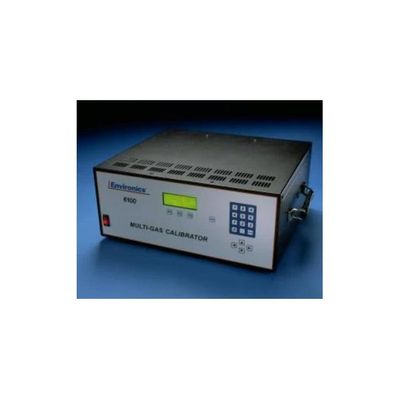
Environics - Model 6100 Series -Ambient Multi-Gas Calibration/Dilution System
The Series 6100 automatically performs zero, precision, span and multi-point calibrations using NO, NO2, SO2, CO, hydrocarbons and more. Custom options can be selected for calibration of ammonia, HCl and a variety of other gases of interest. The S6100 is a great option for dilutions from ppm or lower level cylinders. For higher dilutions, please refer to the S4040 and S4020 dilution systems. For ozone or NOx calibrations, see our calibrators with ozone generation.
The Environics® Series 6100 Multi-Gas Calibration/Dilution System is the ideal instrument for dynamic multi-point gas calibration when working with low level gases (<1%).
New options include a Purge feature and the ability to include up to 6 span ports. Contact us for more information!
The Series 6100 consists of a single chassis supporting up to 3 thermal mass flow controllers, an inline mixer and control electronics. Units can be built for 120V, 240V or 24V operation. Common options include permeation, humidification, heated flow path, silicone coated flow path and more.
Commands are entered from the front panel and displayed on a backlit 4 line by 20 character liquid crystal display. The instrument may also be remotely operated using contact closures or the RS-232 serial data interface, both are standard in the Series 6100.
The 6100 comes standard with two mass flow controllers, but a third can be added to support a larger range of dilutions. The mass flow controllers are calibrated to a NIST (National Institute of Standards and Technology) traceable primary standard. The calibration data consists of a comparison of desired versus actual flow over the full dynamic range of the instrument with linear interpolation between points. Calibration data is stored in non-volatile memory and may be updated by the user with a suitable standard.
The Series 6100 is available in either a standard rack mount or portable configuration.
- User-friendly interactive software with plain language prompts is simple to use, reducing technician training time and virtually eliminating error.
- Automatic calculation of dilution and span gas flows based on commanded concentration eliminates the need for manual computation and allows rapid transition from point to point.
- Internally-stored mass flow controller calibration data improves accuracy by as much as a factor of ten and simplifies field recalibration. Mass flow controllers are factory calibrated at 11 points.
- Full, two-way RS-232 Serial Data Interface (standard) permits remote operation of the instrument including data collection, gas selection, initiation of zero, span and multi-point calibrations.
- Concentration Mode In response to software prompting, user selects gas port, span (cylinder) gas concentration, output gas flow (total) and output gas concentration. Series 6100 automatically delivers concentrations at the total flow specified.
- Flow Mode Allows user to manually command a desired rate of flow for each mass flow controller, individually or together, and with or without ozone.
- Display Allows user to monitor flow rates for each mass flow controller separately.
- Maintain Ports User enters the name of the span gas in the source cylinder, its concentration (ppm) and the port to which the cylinder is connected.
Performance*
- Accuracy
- Concentration: ± 1.0% setpoint
- Flow: ± 1.0% setpoint
- Flow Repeatability: 0.05% F.S.O
- Warm up time: 30 minutes
Mechanical
- Inlets Balance: External 1/4" Swagelok*
- Span(s): External 1/4" Swagelok*
- Outlet
- One external 1/4" Swagelok*
- *(or compatible fitting)
- Operating Pressures at inlets (flow dependent)
- Minimum: 20 psig (1.38 Bar)
- Nominal: 25 psig (1.72 Bar)
- Maximum: 30 psig (2.07 Bar)
- Wetted Surfaces
- Tubing: Teflon® (standard), 316ss (optional)
- MFCs: Stainless Steel
- Seals: Viton® (standard), Kalrez, Neoprene (optional)
- Operating temperatures
- 32° - 122° F (0° - 50° C)
- Performance Temperature Range
- 59° - 95° F (15° - 35° C)
- Weight
- Standard: 20 lbs.
- Including Options: 30 lbs.
- Dimensions (w x h x d)
- Portable: 17" x 7" x 15"
- Rack: 19" x 7" x 15"
Electrical
- Voltage: 100 to 250 VAC, 50/60 Hz; 24V option available
- Current: 2 Amps (maximum)
Operating Modes
- Front panel keypad
- Internal timer control
- RS-232 serial data interface
- I/O control (8 inputs / 8 ouputs)
Data I/O
- RS-232 serial data interface
- I/O Control (8 inputs / 8 outputs)
- 3rd Mass Flow Controller
- Rack Mount
- Extra Gas Inlets - up to 6 span ports for 2 MFC system and up to 5 span ports for 3 MFC system
- Permeation Oven
- Various Seal Materials including Teflon and Kalrez
- Cleaned for Oxygen Service
- Humidification
- Permeation
- Silicon Coated Gas Path
- Heated Flow Path
Today, is the final part in our series on some of the common questions on troubleshooting the Series 6100. The full user and service manuals can be found here.
Part 1 looked at what to do if your display does not come up, while Part 2 and Part 3 focused on what to do if you are seeing issues with flow. Part 4 looked at what to do when you were not getting any ozone regardless of the command. Part 5 look at a variety of ozone issues including drifting and unstable ozone. We also looked at what to do when you are getting high ozone in response to any command.
Today, we will look at how to troubleshoot the presence of ozone in the ABSENCE of a command.
Like Part 5, this focuses on the S6100, which have an ozone generator but not a photometer. We will finish the series by returning to ozone troubleshooting in a 6103.
Let us know if you have a specific issue you’d like us to cover!
Note: Customers who work on their units accept the risks of working on machinery and are responsible for taking all proper safety precautions. If in doubt, contact our service department!
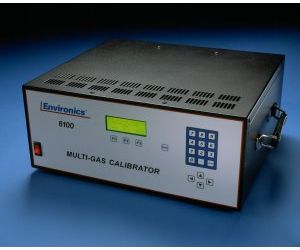
NEVER unplug the lamp while the unit is powered on. This can damage the circuitry. Remove the ozone generator cover to access the ozone generator PC410 board.
Make sure all ozone calibration data and ADCs 11, 13 and 15 (found in the SYSTEM mode) are valid and consistent with the last calibration.
If the data is all accurate, make sure that the zero potentiometer (R46) is adjusted so that the voltage at TP2 on PC410 is between 80 and 100 mV with a zero ozone command. Note: adjustments to this potentiometer will affect calibration. If this adjustment is set incorrectly (to low), it can cause the ozone lamp to light with no command.
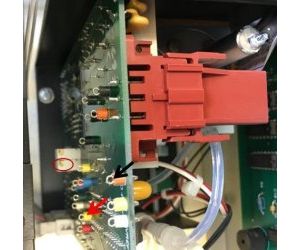
Ensure that the command voltage at TP4 on PC410 is zero. If it is not, the lamp drive circuit or photo detector circuit on the PC410 may be bad and we would suggest a replacement of the PC410. The ozone would then need to be recalibrated, so we recommend this be done in the factory. You can contact our service department for assistance.
Need either further assistance or to order replacement parts? Contact us!