- Home
- Companies
- Solinst Canada Ltd.
- Products
- Solinst - Model 3001 - Levelogger 5 App ...
Solinst - Model 3001 -Levelogger 5 App Interface
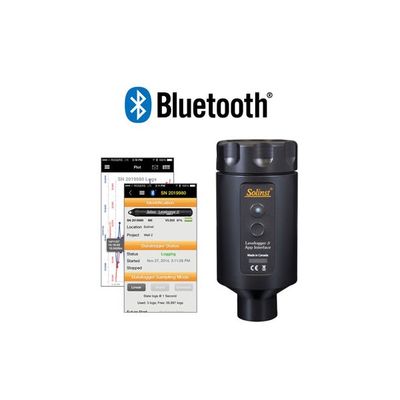
The Solinst Levelogger App and Levelogger 5 App Interface can be used to program, view, or download data from a Bluetooth® connected Solinst datalogger on your iOS or Android™ smart device. The Solinst Levelogger App is available free on the App StoreSM and on Google Play™. The App allows you to e-mail and share data logs right from your smart device. To communicate with the Solinst Levelogger App, dataloggers are connected to the Levelogger App Interface, which provides a Bluetooth connection between your datalogger and smart device.
The Solinst Levelogger App is designed to communicate with Solinst dataloggers using the Bluetooth® enabled Levelogger App Interface. The App can be downloaded for free on your smart device.
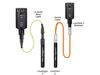
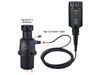
To connect your dataloggers to the Solinst Levelogger App, you need the Levelogger 5 App Interface—a simple, portable device that connects to the top of your Levelogger's Direct Read Cable or Adaptor, LevelVent Wellhead, or AquaVent Wellhead Connector Cable. Your Apple smart device pairs with the Levelogger 5 App Interface using short range wireless Bluetooth technology, enabling communication with your connected datalogger.
The Solinst Levelogger App is streamlined and very intuitive, making it easy to use. The Solinst Levelogger App provides information about the connected Levelogger, including battery level, serial number, and location.
The Application provides all major programming options available with the Solinst Levelogger PC Software, but without the need to bring a bulky laptop to the field. You can save up to 10 program settings that can be applied to Leveloggers. This can help standardize all Leveloggers across a project.
The App allows you to immediately check real-time readings from the connected datalogger, as well as view logged readings in a graph or database format. The data can be downloaded onto your smartphone and e-mailed or transferred directly to your computer. Data files can be compensated using the Data Wizard in the Levelogger PC Software.
You can also perform a Levelogger 5 LTC conductivity calibration, and obtain diagnostic information from a connected datalogger using the Solinst Levelogger App.
- Communicate to your dataloggers using Bluetooth
- Makes data collection very efficient
- Eliminates the need to bring a laptop to the field
- Employs the smart technology that you are already using
- Program and start dataloggers right in the field
- View real-time readings, or download and e-mail logged data files
The Levelogger 5 App Interface uses Bluetooth® wireless technology to connect a Solinst datalogger to your smart device. Once connected, you can view data and program the datalogger using the Solinst Levelogger App.
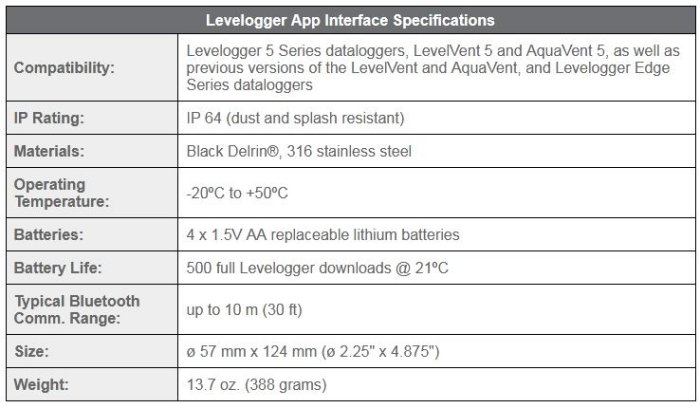
The Levelogger 5 App Interface is compatible with Levelogger 5 Series dataloggers, LevelVent 5 and AquaVent 5, as well as previous versions of the LevelVent and AquaVent, and Levelogger Edge Series dataloggers.
The App Interface is lightweight, compact in design, making it highly portable - excellent for field use. It runs on four 1.5V AA lithium batteries that are easy to replace. The Interface has a power button to turn it on and off, and there is an auto-off after 10 minutes of inactivity. A LED light indicates its status.
Operation is simple:
- Download the Solinst Levelogger App on your smart device. The app is available as a free download on the App Store™ or Google Play™.
- Connect the Levelogger 5 App Interface to the top end of your Levelogger`s Direct Read Cable or Adaptor, LevelVent Wellhead, or AquaVent Wellhead Connector Cable, and turn it on.
- Enable Bluetooth on your smart device and pair the Levelogger 5 App Interface to your device.
- Launch the Solinst Levelogger App and connect to your datalogger.
- Once you are finished downloading or programming your datalogger, disconnect the App Interface, and connect to a datalogger at your next monitoring location. The App Interface is not intended for dedicated applications.