


Pix4D SA software
Model PIX4Dcloud - Cloud Solutions
The online platform for ground and drone mapping, progress tracking, and site documentation.
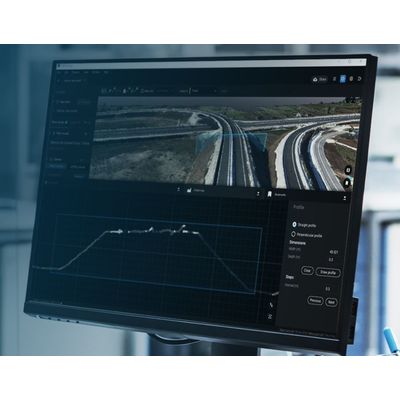
Model PIX4Dsurvey - Digital Surveying
Bridge the gap between photogrammetry and CAD. Capture: Capture images or point clouds with a drone or any laser scanner. When using a drone, automate and optimize your flights with the free PIX4Dcapture mobile app. Import: Import data from other Pix4D software or a .las or .laz file to PIX4Dsurvey and combine multiple datasets into the same project. Work with both imagery data and LiDAR point clouds. Vectorize: Generate a TIN to model the ground and create engineering-ready CAD vector files from point cloud data by extracting key elements of your project with PIX4Dsurvey. Model: Move from a lightweight point cloud to a model of your terrain. Use the Smart Grid, TIN, and terrain classification to get accurate, actionable results Integrate: Open your simplified, accurate data in any CAD or GIS software with custom layers and properties that fit your existing workflow.
Mapping and 3D Modeling

Dmapper - Model Pix4 - Professional Photogrammetry Software
Model PIX4Dmatic - Photogrammetry Software for Professional Drone and Terrestrial Mapping
Are you ready to go big? The optimized software for the next surveying and mapping challenges. Bigger datasets, accurate results: PIX4Dmatic processes thousands of images while maintaining survey-grade accuracy, halving the processing time, without the trouble of splitting and merging. Fully automated processing: Developed in close-collaboration with surveyors and mapping professionals to streamline your workflow: import, process and assess the quality of a project in just a few clicks, and move seamlessly from PIX4Dmatic to PIX4Dsurvey. Terrestrial workflow: Leverage the benefits of both photogrammetry and LiDAR technology. Process LiDAR and RGB image outputs from PIX4Dcatch for a full terrestrial workflow. Easy and desktop-based.
Model PIX4Dreact - 2D Fast-Mapping For Emergency Response And Public Safety
Capture: Fly your drone to capture the images you need. Plan an optimized and automated flight with an app like PIX4Dcapture for Parrot and DJI drones. Process: Combine large numbers of images in minutes with PIX4Dreact. Create measurable 2D maps in the field or back at base. Examine: With PIX4Dreact’s simple tools, identify and measure points of interest, mark and evaluate your maps while on the ground to provide powerful data needed to take action. Share: Export your maps to ensure teams and decision makers are provided with effective information when it’s needed most. Respond: With up-to-date maps, gain precious time, improve safety and reduce costs when responding to an evolving situation.
Model PIX4Dengine - Programming Interfaces (APIs) and Software
PIX4Dengine is a set of programming modules accessible via Application Programming Interfaces (APIs) and Software Developing Kits (SDKs) for extracting critical information from images, running on your infrastructure or on our cloud, and compatible with other Pix4D solutions. Our interfaces are built to empower customization, automation and integration into any enterprise system and reality-capture workflows for photogrammetry.
Data Capture Applications
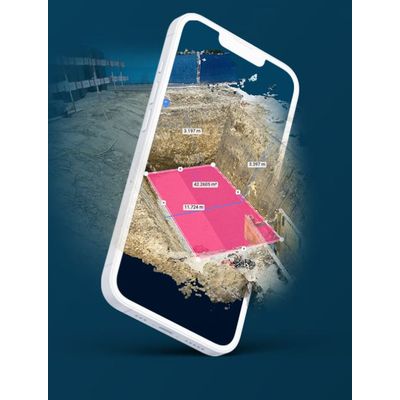
PIX4Dcatch
Turn your mobile device into a professional 3D scanner. From underground utilities to public safety, create a model of your scanned objects for use in different industries. Underground utilities:
Create geolocalized open trenches models by simply walking around them. Accurately document and calculate volumes for invoicing. Construction: Quickly and accurately collect, process, and visualize as-built measurements and 3D models, even in the most demanding conditions. Surveying: Complete an entire survey in a few minutes and create a 3D point cloud, a digital surface model, and a true orthomosaic of your area. Public safety: Document and recreate crime scenes, record evidence, and provide a clear picture for investigators and forensic teams.
Data Capture Hardware
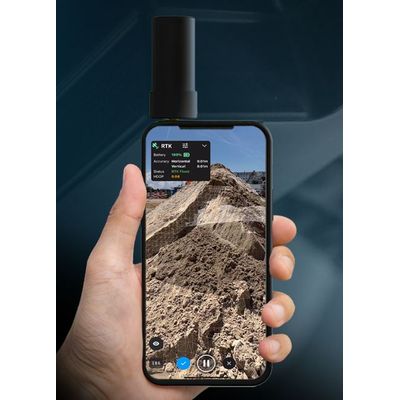
Model PIX4Dcatch RTK Workflow - Terrestrial 3D Scanning With Rtk Survey-Grade Accuracy
Use PIX4Dcatch and the viDoc RTK rover to document trenches. See how you can digitize and accurately document trenches and as-builts on construction sites. Capture: Use your smartphone with the PIX4Dcatch mobile app to capture the asset. Add an RTK device to it, to improve your accuracy. Process: Upload your images automatically to PIX4Dcloud for seamless processing OR import your images from the phone to the PIX4Dmatic desktop app, using the PIX4Dcatch processing template. Export to CAD/BIM/GIS: Mark your assets on PIX4Dsurvey as vectors in the pointcloud and export them as DXF (for CAD) or SHP (for GIS).